Diving Back Into Tech Basics: CompTIA A+

Hey there!
So I’ve been in tech for years, managed IT networks, managed software and web development programs, got my degrees, but never actually nabbed any certifications other than the Project Management Professional (PMP) and Scrum Certification. I’ve decided to formalize my information technology and cloud expertise by grounding myself in the foundations of information technology, including CompTIA A+, CompTIA N+, and CompTIA Sec+.
I will pursue advanced certifications such as CISSP, CCSK, and Azure certifications. However, I am starting with the foundations first and will build on this knowledge as I learn more and work on projects along the way.
Today was… interesting. I dove into Professor Messer’s CompTIA A+ videos, and man, it was like opening a time capsule. Some stuff I knew, some I’d forgotten, and some made me go “Wait, what?”
Laptop Architecture: Piecing Together the Puzzle
Take laptops, for instance. You’d think I’d have this nailed, right? But man, display tech has evolved faster than I realized. We’re talking LCDs, LEDs, OLEDs and beyond - it’s crazy how fast things change, and how much I’d taken for granted. What I picked up from this section is:
- Liquid Crystal Displays (LCDs) use liquid crystals sandwiched between two layers of glass or plastic; they require a backlight, usually fluorescent, to produce images.
- Light Emitting Diodes (LEDs), on the other hand, are a type of LCD that use LEDs for backlighting, which improves energy efficiency and allows for thinner displays.
- Organic Light Emitting Diodes (OLEDs) are a step further; each pixel emits its own light, eliminating the need for a backlight entirely. This results in deeper blacks, higher contrast ratios, and more vibrant colors.
Revisiting the interplay between CPUs, motherboards, and other components felt like solving a puzzle I’d completed before, but with new pieces added.
Mobile Devices: Cellular Standards
The mobile device segment provided valuable insights that I hadn’t previously analyzed in detail. I learned about various connectivity protocols and the importance of device interoperability. Understanding how these different standards work together in real-world scenarios was refreshing to learn. Seamlessly integrating smartphones, tablets, and other mobile devices into existing networks is crucial, but the sheer number of protocols and standards was a lot to digest. Some of these cellular standards included:
- CDMA (Code Division Multiple Access)
Meaning:CDMA is a channel access method used by various radio communication technologies.Usage:It allows multiple users to share the same frequency band by assigning unique codes to each user. CDMA is primarily used in North America and parts of Asia
- GSM (Global System for Mobile Communications):
Meaning:GSM is a mobile networking standard originally developed in the EU, now covering 90% of the global market. Used by AT&T and T-Mobile in the U.S., it allows users to move their SIM cards between phones and employs multiplexing to allocate time slots for communication.Usage:It facilitates mobile vvoice and data services, enabling users to make calls, send text messages, and use mobile data. Its widespread global presence makes it easy for mobile devices to connect to networks in different countries.
- 5G:
Meaning:5G represents the fifth generation of cellular networking, offering significant advancements over previous generations. This new generation of technology promises faster data speeds, lower latency, and the ability to connect a vast number of devices simultaneously.Usage:Launched worldwide in 2020, 5G offers significant performance improvements with speeds eventually reaching up to 10 gigabits per second, though typically between 100-900 Mbit/s. It has a significant impact on the Internet of Things (IoT), enabling larger data transfers, faster monitoring and notifications, and additional cloud processing capabilities.
- Hotspot
Meaning:A feature that allows a mobile device to share its internet connection with other devices. -Usage:By turning a phone into a WiFi hotspot, it acts as a personal wireless router, extending the cellular data network to multiple devices. This feature is dependent on the phone type and provider, and may require additional charges and data costs.
For this section I actually had to break out my old college habit and make flashcards to keep track of these concepts. Additionally, the module on mobile device accessories and their security implications presented novel concepts that expanded my knowledge base.
Serial Interfaces and Storage Migration
Serial interfaces, despite their critical role in device configuration and management, were a concept I struggled to fully grasp. The HDD to SSD migration process was another hurdle.
After diving deeper into the topic of serial interfaces, I’ve come to understand that Serial interfaces are fundamental communication protocols used for transferring data between devices sequentially, one bit at a time. Unlike parallel interfaces, which transmit multiple bits simultaneously, serial interfaces send data sequentially over a single channel. This simplicity makes them reliable for various applications. Below are some key points about serial interfaces:
DB-9 (also called DE-9)
Common Usage:DB-9 connectors are widely used for RS-232 signals.RS-232:This is the Recommended Standard 232, an industry standard since 1969, primarily used for serial communication.Applications:Traditionally, RS-232 was used for modem connections. However, it is now commonly used as a configuration port for various network devices such as switches, routers, and firewalls.Modern Adaptation:With the advent of newer technologies, RS-232 ports are less common on modern computers. Therefore, a USB to DB-9 converter cable is often used to connect devices that require this interface.
What I found particularly intriguing is how essential these interfaces are for various applications, from consumer electronics to industrial systems. Serial interfaces play a crucial role in device configuration, data transfer, and communication, proving their importance in the tech landscape.
HDD to SSD Migration
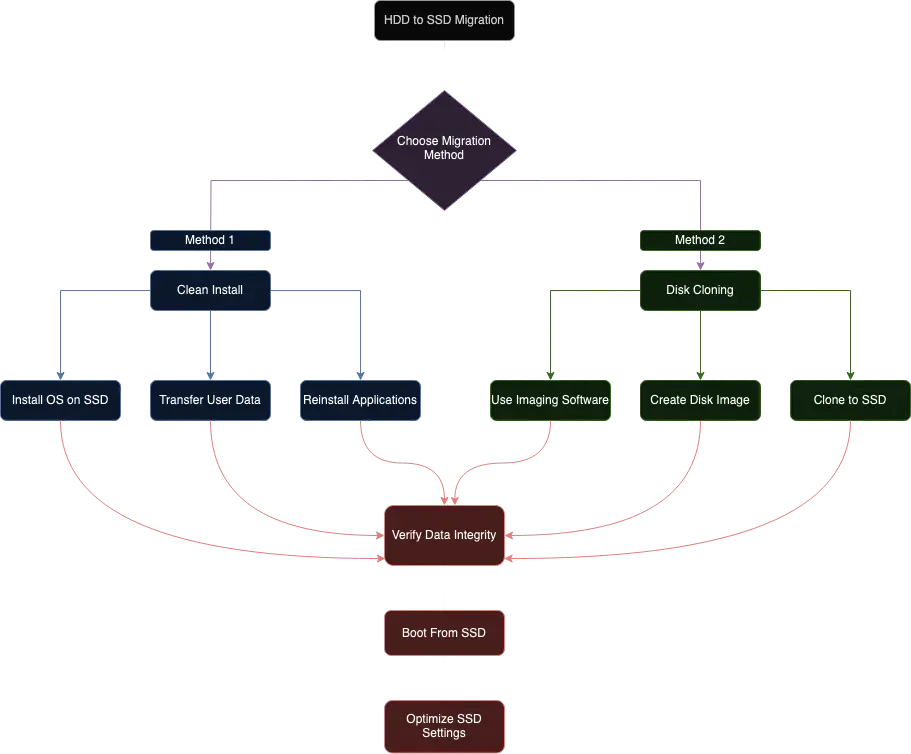
Another challenging topic was HDD to SSD migration. Sounds simple, right? Turns out, there’s way more to it than I thought. At first, I was stumped by the intricacies of ensuring data integrity and managing software considerations during the upgrade. It was like trying to move a house without losing a single brick - overwhelming!
But here’s how I tackled it: I broke it down step by step and created the visual diagram below. This helped me see the whole process - from backing up data to cloning the drive, and even handling potential software compatibility issues. Once I could visualize it, things started clicking. I realized it wasn’t just about speed, but about improving overall system performance, reliability, and energy efficiency. Pretty cool stuff when you get into it!
Looking Ahead: Building on the Foundation
Not gonna lie, some parts were tough. Serial interfaces? Yeah, still wrapping my brain around that one. But you know what? It’s kind of exciting too, this experience has reinvigorated my passion for technology and reminded me of the importance of continuous learning in our ever-evolving field.
So, here I am, back at square one but with a twist. It’s humbling, frustrating, and really cool all at once. Next up: networking and security. Wish me luck - I might need it!